Quick Answer
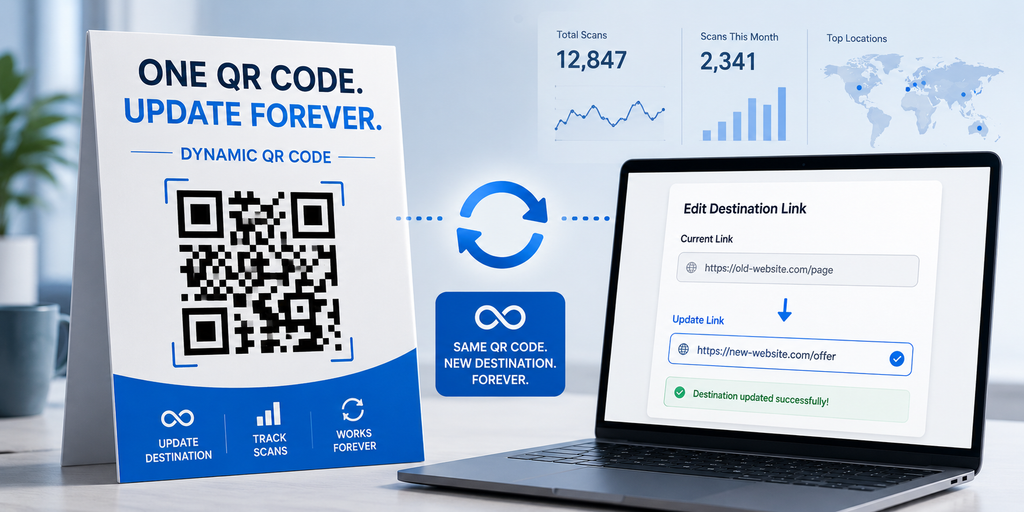
A dynamic QR code generator makes a QR code that stores a short link instead of fixed data. You can change where that link goes at any time. The printed square never changes, but the page it opens can be swapped as often as you want. Static QR codes cannot do this.
Most people find this out the hard way. You print 500 posters. Two days later the venue moves, the form link breaks, or the price changes. Every one of those posters is now useless paper.
That is the exact problem a dynamic QR code generator solves.
What a Dynamic QR Code Generator Actually Does
- Dynamic QR code: A QR code that encodes a short redirect URL. The QR pattern is fixed, but the destination behind the redirect can be edited by the owner at any time, without reprinting.
- Static QR code: A QR code that encodes the actual data (a link, WiFi password, or contact card) directly inside the black and white pattern. Once printed, the data can never change.
The difference sits in what gets encoded.
A static code carries your data in its pixels. A dynamic code carries a pointer. When someone scans a dynamic code, their phone hits the short link first, and the short link sends them wherever you last told it to go.
Because a server sits in the middle, a dynamic QR code generator can also count the scans. That is why every tool with analytics uses dynamic codes.
Tools such as IMQRScan – Dynamic QR Code Generator, QR Tiger, Bitly, and Uniqode all follow this same model. The pricing and the dashboards differ. The underlying method does not.
Static vs Dynamic: A Straight Comparison
| Feature | Static QR Code | Dynamic QR Code |
|---|---|---|
| Edit after printing | No | Yes |
| Scan tracking | No | Yes |
| Data stored in pattern | Yes, full data | No, only a short link |
| Works without internet | Yes, for text and WiFi | No, needs a connection |
| Expires if you stop paying | No | Usually yes |
| Typical cost | Free | Paid, from about $3 per month |
| Best use | Permanent info | Anything that might change |
Read that “expires if you stop paying” row twice. It is the single most important trade off, and most articles skip it.
Key Takeaway: Use a static code when the information will never change. Use a dynamic QR code generator when it might. If you cannot say for sure, dynamic is the safer choice, as long as you plan to keep the subscription active.
A Real Example: The Coinbase Super Bowl Ad
In February 2022, Coinbase ran a Super Bowl LVI advert that was nothing but a colour changing QR code bouncing around a black screen for a full minute. No voiceover. No logo.
It worked. The company reported over 20 million hits on its landing page in one minute, and the site briefly crashed under the load.
That advert only made sense because the code was dynamic. Coinbase could point it at a promo page, watch the traffic live, and change the destination later without buying new airtime. A static code would have locked them to one URL forever.
You do not need a Super Bowl budget to use a dynamic QR code generator the same way. The logic scales down to a single poster on a notice board.
Where Students and Colleges Actually Use This
Campus life is full of information that changes at the last minute. That is exactly the situation a dynamic QR code generator is built for.
- Event posters. Venue changes, timing changes, and speaker swaps happen constantly. One code on the poster, updated from your phone.
- Registration forms. Point the code at a Google Form now, then at the confirmation page once entries close.
- Resumes and CVs. A QR on your CV that opens your portfolio today and your GitHub next year.
- Project reports. Link to a demo video, then update it when you record a better one.
- Society membership cards. One printed batch, updated group links each semester.
- Study notes and handouts. Swap the linked PDF when you fix an error.
Best Practice: Never point a printed dynamic QR code at a link you do not control. If you link to a shared Drive folder someone else owns, and they delete it, your code breaks. Link to a page you own, then redirect from there.
How to Use a Dynamic QR Code Generator in 5 Steps
The steps below are nearly identical across every dynamic QR code generator on the market.
- Pick your tool and create an account. Dynamic codes always need a login, because the tool has to store your redirect somewhere.
- Choose the code type. URL is the most common. Some tools also offer PDF, vCard, menu, and app store types.
- Paste your destination link. This is the page people land on. You can change it later.
- Customise the design. Add your logo, set brand colours, and pick a frame. Keep strong contrast between the dark pattern and the background.
- Download and test before printing. Choose SVG or PDF for print. Scan the file on two different phones first, one iPhone and one Android.
That last step takes 30 seconds and prevents the most expensive mistake in this whole process.
What a Dynamic QR Code Generator Cannot Do
Honest answers matter more than feature lists here. A dynamic QR code generator has real limits, and none of them are hidden in the small print by accident.
- It cannot work offline. The scan has to reach the redirect server. In a basement lecture hall with no signal, a dynamic code fails and a static one still works for text and WiFi.
- It cannot survive a cancelled subscription. If you stop paying, most providers switch off the redirect. Your printed codes go dead. Ask any tool you are considering what happens on cancellation before you print anything.
- It cannot be converted from an existing static code. You cannot upgrade a static code into a dynamic one. The pattern itself is different. Canva states this plainly in its own help pages, and it is true of every tool.
- It cannot hide where it goes. Careful scanners see the short link before tapping. Some people will not tap a domain they do not recognise. Using a custom domain helps.
How to Choose a Dynamic QR Code Generator
Every dynamic QR code generator advertises the same feature list. These four questions separate them properly.
- What happens when I stop paying? Some freeze the code. Some delete it. Some keep the last destination alive.
- Is there a scan limit? Free tiers often cap you at a few hundred scans a month, then stop redirecting.
- Can I use my own domain? A branded short link gets tapped more often than a generic one.
- Where is my data processed? IMQRScan, for example, generates codes in your browser, so passwords and contact details are not sent to a server. That matters most for WiFi and vCard codes.
A quick look at cost
| Tool | Free dynamic codes | Paid plan starts at |
|---|---|---|
| IMQRScan | Free Trial | About $2.99 per month |
| Canva | Yes, limited | Included with Canva Pro |
| QR Tiger | Limited trial | Around $7 per month |
| Bitly | Limited | Around $8 per month |
Prices shift, so check the current page of any dynamic QR code generator before you commit. The pattern holds though. Free dynamic codes almost always come with a scan cap, a watermark, or an expiry date.
Where IMQRScan does not fit: if you want dynamic codes at zero cost, it is not your tool. Its free tier covers unlimited static codes with no expiry, and dynamic features sit behind the paid plan.
Three Mistakes People Make With Dynamic Codes
Most failures have nothing to do with technology. They come from small decisions made before printing.
- Printing before testing. A dynamic QR code generator gives you a preview on screen. A screen preview is not a scan test. Download the real file and scan it from paper, not from your monitor.
- Using low contrast colours. Pale grey on white looks clean in a design mockup and fails in a dim corridor. Keep the dark part clearly darker than the background.
- Removing the quiet zone. The blank margin around the pattern is part of the standard, not decoration. Cropping it tight is one of the most common reasons a printed code stops scanning.
Best Practice: Print one test copy at the exact final size on the exact final material. Scan it in the room where it will live, under that room’s lighting. Then order the full batch.
Should You Use One?
Ask one question. Could the information behind this code change within its printed lifetime?
If the answer is yes, a dynamic QR code generator saves you a reprint. If the answer is no, a free static code does the job with no subscription and no expiry risk.
For a permanent WiFi password or a fixed contact card, static wins. For anything tied to an event, a form, a promotion, or a semester, dynamic wins.
Frequently Asked Questions
Can I change a dynamic QR code after printing it?
Yes. That is the whole point. Log in, edit the destination link, and every printed copy sends people to the new page on the next scan.
Do dynamic QR codes expire?
The code itself does not expire, but the redirect usually stops working if you cancel your plan. Check your provider’s cancellation policy before printing anything.
Is a dynamic QR code generator free?
Rarely, and never without limits. Free plans typically cap scans, add watermarks, or expire after a trial. Static codes are the ones that are genuinely free.
Can I turn my static QR code into a dynamic one?
No. The two codes encode completely different things. You have to generate a new dynamic code and reprint your materials.
Do dynamic QR codes work on iPhone and Android?
Yes. Both read them natively through the camera app. iOS 11 and later and Android 9 and later need no extra app installed.
Can I add my college logo to the code?
Yes. Most tools support logo upload with high error correction, which keeps the code readable even when part of the pattern is covered.
How small can I print a dynamic QR code?
Two centimetres square is the practical minimum for close scanning. Use eight centimetres or larger for wall posters read from a distance.
Does the code track who scanned it?
It records scan counts, rough location, device type, and time. It does not identify individual people or collect names.